
Message from the CEO
Apps Part 2: Getting Around the Epic App
July 2026
Last month, I introduced the basics of streaming: what it is, what you need to get started, and why your kids or grandkids can sometimes be your best technical support team. The response was encouraging, and many of you asked for more practical tips.
So, this month, let’s build on that foundation and take a closer look at the EPIC app itself. Once you’ve downloaded the app and signed in, what do you do next? For many people, that first screen can feel like stepping into a new town without a map. The good news is that it’s much simpler than it looks.
The Home Screen
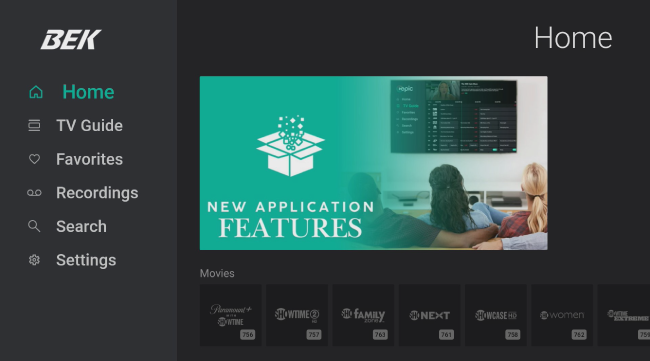
When you first open the EPIC app, you’ll land on the Home screen. Think of it as the front porch of the app where everything begins.
Near the top, you’ll find channels and programs you’ve watched recently, making it easy to jump right back into your favorite content. As you scroll down, you’ll see additional categories such as Movies, Sports, News, Religious programming, Shopping, and more.
The key is not to let the Home screen overwhelm you. You don’t need to explore every option at once. Start with what interests you and become familiar with the layout. Before long, you’ll find yourself navigating it with ease.
The Guide
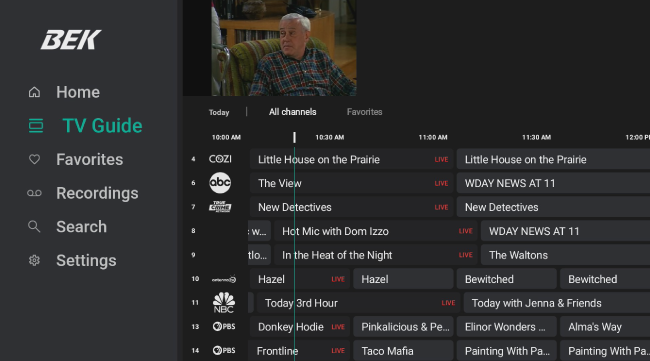
The Guide may be the most familiar part of the app because it works much like the printed television guides many of us used for years.
When you select Guide, you’ll see channels listed on one side and times displayed across the top. Scroll down to browse channels, or scroll right to see upcoming programs later in the day. When you find something you’d like to watch, simply select it and begin viewing.
One feature many people enjoy is Time Warp, which allows you to restart many programs that have already aired. If you scroll left in the Guide, you’ll often find programs that have already run. Many of these programs can be restarted from the beginning, even if you tuned in late. In most cases, content is available to restart for up to three days after it airs.
The Issue May Have Nothing to do with the EPIC App
Just like your computer, smartphone, or tablet, streaming devices perform best when they are restarted from time to time. While traditional cable-tv set-top devices are designed to stay powered on, the newer TVs, streaming devices, and Apps need to be exited after using, restarting it when you use it again. This refreshes the system, clears temporary files, loads updates, and improves overall performance.
If you’ve ever fixed a slow computer or smartphone by simply turning it off and back on again, the same principle applies to streaming devices. A quick restart can often resolve sluggish performance, outdated guide information, buffering issues, or apps that aren’t behaving as expected. Here’s how to do that, depending on how you stream:
STREAMING FROM THE EPIC APP ON THE EPIC BSD SLATE
(This means you have a little black box with the EPIC logo on it.)
The STB Power button on your EPIC remote (usually green and located in the upper-left corner) puts the EPIC box into sleep mode. This works great throughout the day and allows you to quickly resume watching where you left off.
However, like a computer or smartphone, your EPIC box benefits from an occasional restart. If the box remains in sleep mode for extended periods of time, performance may gradually slow down.
At the end of the day, press and hold the green STB Power button for a few seconds. A menu will appear with options to Power Off or Restart. Selecting Power Off gives the box a fresh start the next time you turn it on and can help keep your EPIC experience running smoothly.
If you notice that the guide looks incomplete, channels take longer to load, or the app seems sluggish, selecting Restart is often a quick and easy fix. From the Main Menu, use the back button to bring up the Exit the App options. Select Exit and press the OK button.
STREAMING THE EPIC APP ON A FIRE TV STICK, ROKU, APPLE TV, OR OTHER STREAMING DEVICE
Turning off the television doesn’t necessarily turn off the device. Many streaming apps continue running in the background, and the power button on the remote often controls only the TV, not the streaming device itself.
If you notice apps loading slowly, buffering more than usual, or guide information looks incomplete, go back to the home screen and restart the app.
We’re Here for You
Technology shouldn’t leave anyone behind. At BEK Communications, our mission is connecting communities, and that means helping our members feel comfortable using the services we provide.
If you have questions about the EPIC app, streaming, or any of our other services, please don’t hesitate to contact our team. We’re always happy to help.
More stories in this Issue

Hidden Stories Among Us
July 2026

Message from the CEO
July 2026

Annual Meeting Review
July 2026

Behind the Board
July 2026

New Program on BEK TV
July 2026

From the Fire Station to the Playground
July 2026
Is Your Router Putting Your Home Network at Risk?
July 2026

Six Times and Counting
July 2026

Click Smart – Stay Cyber Safe
July 2026
